Setting Up a Google Business Profile: Irish Trades Guide
A profile can put your trades business in front of local customers on Google Search and Maps. A step-by-step guide for Irish sole traders.
/9 min read
A Google Business Profile is the listing that appears when someone searches a trades business by name on Google, and the pin shown on Google Maps when a household searches for a service nearby. It suits Irish sole traders, service-area businesses such as plumbers, electricians, roofers, gardeners and cleaners, and small local trades firms that want work in their own town or county. The setup path is short: sign in with a Google account, add the business as it is actually traded, choose a category, decide between a visitable address and a service area, then complete Google's verification so the listing goes live — the starting point for local SEO for trades and service-area businesses.
Who in Ireland should set one up
Any sole trader taking enquiries from the public benefits. That covers a one-person plumbing, electrical, gardening, cleaning, tiling or handyman operation working from a van, and a small firm running a couple of vans across one or two counties. A business with a counter, showroom or yard that customers visit should list that location, and a business with two genuine branches should have a profile for each branch rather than one covering both.
A profile is less useful for a business that works only for other businesses on contract, has no trading name yet, or has not started trading. Waiting until there is a name on the van, a phone that is answered and one finished job makes verification and reviews far easier.
The main setup path, step by step
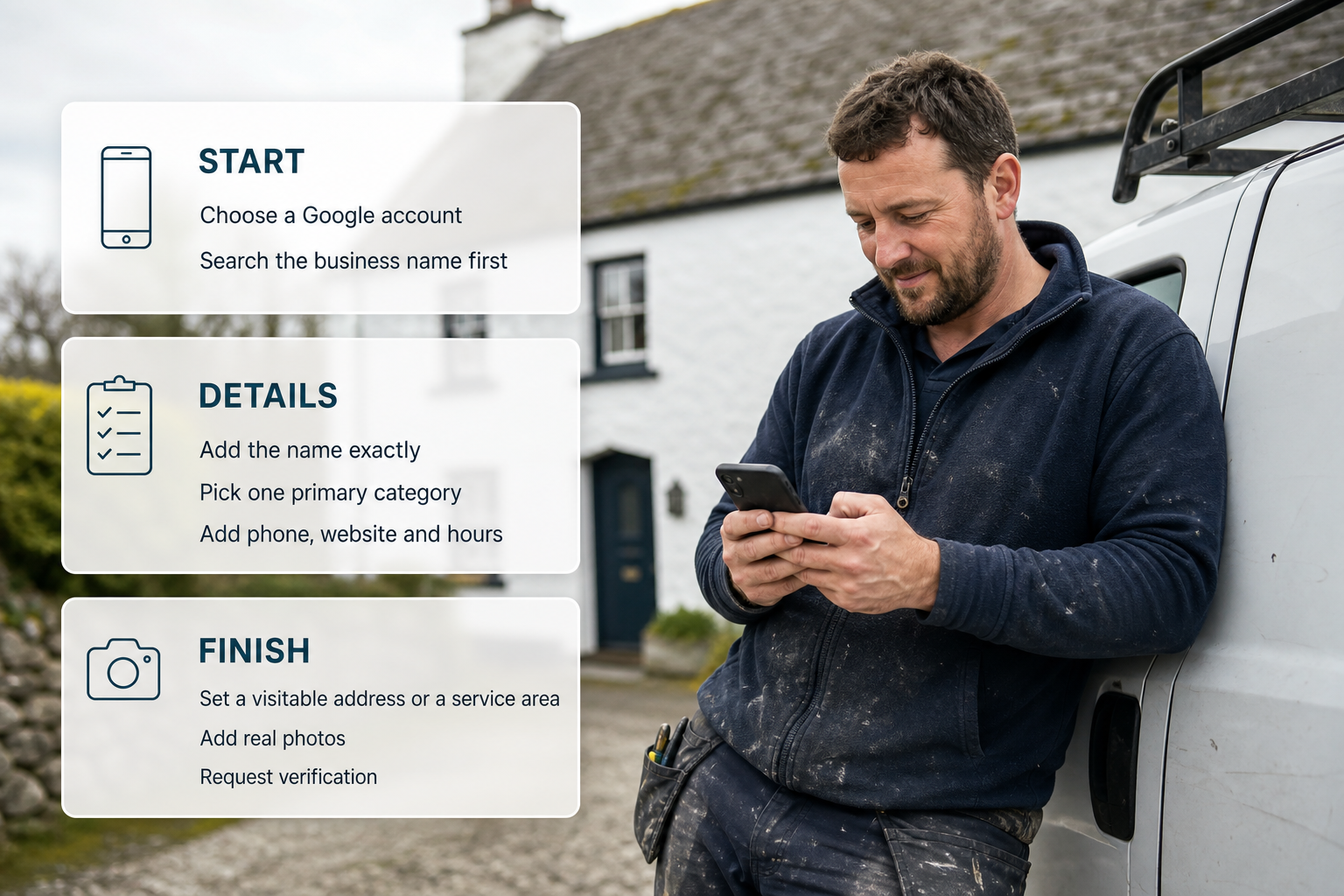
Choose a Google account the business will keep, tied to a business email address rather than a personal one that could be lost along with a phone.
Search the business name first, in case a profile already exists.
Add the name exactly as it appears on the van, invoices and signage.
Pick one primary category that matches the main trade, then add secondary categories that genuinely describe other work.
Add the phone number that is answered on site, the website if there is one, and opening hours, including weekend call-out hours where they apply.
Set a visitable address or a service area, whichever matches how the business trades.
Write the description in plain language about the work and the areas covered, without a list of towns padded in.
Add real photos: the van, the team, finished work.
Request verification, then leave the details alone until the listing is live.
Open the profile management area on the phone so hours, photos and replies can be handled from the van.
Claiming a profile that already exists
Many Irish trades businesses already have a profile created automatically from public information, or set up by a previous website company, an agency or a former employee. Searching the business name, the phone number and the address before creating anything is the most useful habit here: if a profile is already there, claim it. The claim route runs through the listing itself — open it while signed in, choose the option to claim or request access, and follow the prompts. Google decides whether the claim is granted, and where someone else already manages the listing the request becomes an ownership dispute rather than a new profile.
Verifying ownership
A profile stays inactive until Google confirms the person managing it is entitled to. The method is chosen by Google for each business and differs between trades: some are confirmed by post, some by phone or email, and some by a recorded walkthrough of premises, tools or vehicle. Google sets the method and the evidence it accepts, and both change over time, so the current requirements are best checked inside the profile before starting.
Three habits make verification smoother. Keep the business name, address and phone number identical on the website, invoices, van and any other listing, because mismatched details are what usually stall a check. Answer Google's requests quickly. Avoid editing the name, category, address or phone number while a review is open, and if an attempt fails, correct whatever does not match and start again rather than opening a second profile.
Service-area businesses and when to hide the address
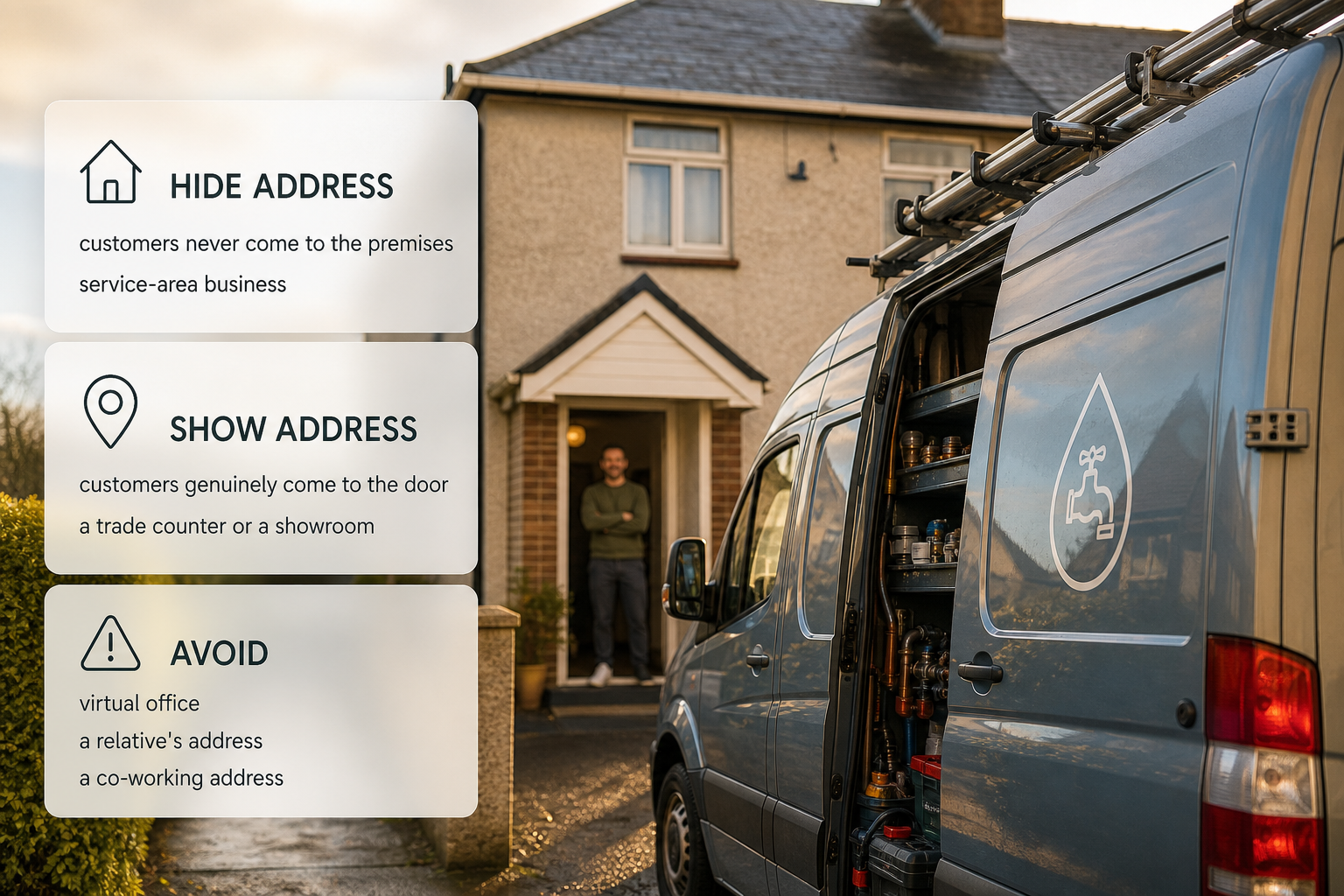
This is the decision that trips up most home-based trades businesses. Where customers never come to the premises — a plumber working from a house, a gardener with a lock-up used for storage, a cleaner whose van is parked at home — the address should be hidden and the profile set up as a service-area business. The listing then shows the areas covered rather than a street address, which keeps a home address off a public map without keeping the business out of local results. Where customers genuinely come to the door, such as a trade counter or a showroom, showing the address is the better choice.
A service area should describe ground actually covered: the towns and counties reachable without turning a job into a loss. Widening it to the whole country brings in no extra work and weakens how the profile matches nearby searches. Using a virtual office, a relative's address or a co-working address the business does not trade from is a frequent cause of failed verification and suspended listings.
Anyone running a business from a home should also check what the landlord, insurer and local authority expect before publishing that address, since those are separate matters from anything Google decides.
Photos, customer information and regular updates
Photos are the fastest way for a household to judge whether a business is real and local: a signwritten van, a team in work clothes, a tidy before-and-after, a finished bathroom or garden. Stock images and heavily edited pictures do the opposite. A few fresh photos every few weeks beat one large upload. Photos, posts and updates are the visible part of a wider SEO, marketing and growth routine that keeps a trades business in front of local customers.
The rest of the profile should answer the questions people ask on the phone: what is offered, whether emergency call-outs are available, which areas are covered, how quickly a quote is given, and how payment is taken after a job. Questions asked by customers should be answered in the same plain tone as a phone call.
Reviews
Ask for a review at the end of a job while the customer is standing in front of the finished work, and follow up with a short message and a direct link when that suits them better. Reply to every review, including poor ones — a short, calm, factual reply does more for a trades business than the review itself. Reviews should come from customers, one per job, never from family, staff or anyone paid or rewarded in return, because Google's review policies govern what counts as genuine.
Duplicate profiles and ownership disputes
Search the business name, the phone number and the address before anything is created. If a listing is there but unclaimed, claim it. If two listings for the same business have appeared, one has to go: keep the one with the right name, phone number and service area and the longer history of reviews, and report the duplicate from inside the profile so Google can review it. Deleting a listing with reviews in favour of a fresh one is usually the worse choice.
An ownership dispute arises when a listing is controlled by someone else — a former business partner, a previous employee, or an agency that set it up. The request-access route inside the profile is the starting point, and evidence that the requester runs the business is normally needed: business documents, an insurance certificate, a lease, a utility bill, van registration or signage. Google decides these cases, and a duplicate profile created out of frustration makes the dispute harder.
Suspension, reinstatement and lost access
A suspended profile usually shows a message in the management area along with an email to the account holder. The useful first step is to look at the fields Google flags — a name stuffed with keywords, an address that does not match, a category that does not fit, a service area far wider than the business — and bring the listing back to plain, accurate information. The reinstatement request is made through the profile itself.
Losing access is different from losing the profile. If the Google account is unreachable, account recovery comes first; if the account is fine but the listing is controlled by someone else, the request-access and ownership route applies. Access is worth reviewing once a year, giving new staff their own access rather than passing around one password, and removing anyone who has left.
How the profile shapes visibility on Google Maps
Google matches a local search using three broad ingredients: relevance, distance and prominence. Relevance comes from the category, the services listed, the description and the reviews. Distance is about how far the searcher is from the service area or the address. Prominence covers how well known the business appears to be — steady reviews with replies, recent photos, regular updates, a website using the same name and number, and mentions elsewhere online.
That is why consistency matters: the same business name and phone number on the profile, the website, the van and other listings reinforce each other, while a different number on a directory listing splits the signal. Local mentions help in the same way, whether that is a club sponsorship, a community noticeboard or a local newspaper item using the business name. A complete profile with real photos, a reviewed history and accurate service areas competes far better in Google Maps than an empty one.
FAQ
Does an Irish trades business have to show its address on Google?
No. A business whose customers never visit can be set up to show covered areas instead of a street address, while still having a real base that Google can confirm. Showing an address is the better option when customers actually come to the door.
How does a service-area business get verified without a shopfront?
Verification is about proving the business exists and that the person managing the listing runs it, not about proving there is a shop. A van-based business should be ready to show tools, vehicle, paperwork or workspace when asked, and keep its name, phone number and covered areas matching everywhere it appears.
My profile was suspended after I changed the business name — what now?
Put the name back to exactly what appears on the van, invoices and signage, check that the address, category and service area are accurate, and then use the reinstatement route inside the profile. Opening a second listing will not speed anything up and can make reinstatement harder.
How do I get rid of a duplicate listing for my business?
Claim the listing with the reviews and history, keep its name and phone number identical to the website and van, and report the other one from inside the profile so Google can review it. Where a duplicate was created deliberately by someone else, the ownership route runs alongside it.
Will a Google Business Profile replace a website?
No. The profile is where local searches land and it handles calls, directions and enquiries well. A website still carries service pages, photos and proof of past work, and the two work better together when they use the same business name and phone number.
Where a free Irish marketplace fits
Irish trades businesses looking for work from local homeowners can also keep a listing on ShamFix, a free Irish marketplace where homeowners post jobs and local tradespeople respond. Posting a job and listing on ShamFix is free and there is no commission, with a subscription planned for the future. ShamFix does not check or certify tradespeople and profiles are filled in by tradespeople themselves, so homeowners should check registrations themselves and read reviews.
Work through safe checks — filter, vent, condenser, settings, power and reset — then book appliance repair or, for fixed wiring faults, an electrician.